> ## Documentation Index
> Fetch the complete documentation index at: https://kosli-6267-evaluate-policy-tutorial.mintlify.site/llms.txt
> Use this file to discover all available pages before exploring further.
# Evaluate policies server-side
> Proposed beta design: ship a versioned policy to Kosli, then evaluate it server-side to record a trustworthy, replicable decision.
**Proposed design — not yet available.** This page describes planned beta behavior for
server-side policy evaluation and is published to gather feedback *before* the feature is
built. The commands, flags, and output shown are illustrative and will change as the design
firms up. Nothing here can be run against Kosli today. Share comments with the Kosli team.
Today, `kosli evaluate` runs **client-side**: the policy lives in your repository, the check
runs on your CI runner, and Kosli only learns the outcome if you **explicitly attest it back** —
a self-reported result Kosli takes on trust. Server-side policy evaluation moves the Policy
Decision Point (PDP) **into Kosli**. You ship a versioned policy to Kosli, Kosli executes it
against facts it already holds, and Kosli **records the decision itself**, along with the exact
policy version and inputs it used.
## Start here
### Publish a policy, then evaluate it
Two commands, which the rest of this page fills in:
```shell theme={"theme":"dracula","languages":{"custom":["/languages/rego.json"]}}
# Publish a versioned policy into Kosli, once.
kosli create policy pr-approved pr-approved.rego \
--type rego \
--input-schema trail \
--name "Pull request approved"
# Evaluate it from your pipeline, as often as you like.
kosli evaluate policy \
--flow my-release-flow \
--trail my-release-trail \
--policy pr-approved \
--control RCTL-043 \
--context trail=my-release-trail \
--fingerprint "$ARTIFACT_FINGERPRINT" \
--name pr-approval-decision \
--params '{"pr_attestation_name": "pull-request"}' \
--assert
```
Kosli evaluates the attestations on `my-release-trail` and records a **decision** against control
`RCTL-043`, citing the policy version, the parameters, and the exact facts it used. `--flow` and
`--trail` say where the decision is recorded, as on any other Kosli command, and `--context` says
which trail's facts to evaluate — the same trail here, a different one when you need it. `--assert`
fails the pipeline step if the policy denies. Everything else on this page is detail around those
two commands.
**Adding `--control` is what records a decision.** Omit it and Kosli still runs the policy and keeps
the result, but writes no decision — an
[ad-hoc evaluation](#evaluate-without-recording-a-decision) you can inspect without adding anything
to the audit trail. That makes this one command two things: a way to check a policy against real
facts, and a way to claim a control is satisfied.
### What is in the beta, and what is not
**In:** publishing versioned policies, evaluating them against a trail or trails, running evaluations
that record no decision, recording decisions against controls, validating and testing policies, and
reviewing or exporting the decisions a policy has produced.
**Not in:** evaluating anything other than trails, evaluating the contents of attachments, composing
several **published** policies into one evaluation, scheduled evaluations, pinning an evaluation to
a policy version, and advisory-only outcomes. See the
[full list, with reasons](#out-of-scope-for-the-beta).
### Where to go next
For **governance platform engineers**. Publishing and evaluating, the Rego contract, testing, and
managing policies over time.
For **auditors and control owners**. Review, filter, sample, and export decisions — and re-run one
yourself to check it.
For **application teams**. Understand why a policy denied and what to do about it.
This is distinct from the existing client-side
[Evaluate trails with OPA policies](/tutorials/evaluate_trails_with_opa) tutorial, where the
CLI runs the policy locally. Here, Kosli stores the policy and performs the evaluation.
## Why server-side
Running evaluation inside Kosli changes **who computed the decision** — and where the data is
processed:
| | Client-side `kosli evaluate trail` (today) | Server-side `kosli evaluate policy` (proposed) |
| -------------------------- | -------------------------------------------- | --------------------------------------------------------------------- |
| **Where the policy lives** | Your repository | Stored and versioned in Kosli |
| **Where it runs** | Your CI runner | Kosli (isolated from the API) |
| **What Kosli stores** | Whatever you attest back (self-reported) | A decision Kosli computed, with the policy version and inputs it used |
| **Data movement** | Full trail evidence is fetched to the runner | Evaluated in place — nothing shipped to the client |
| **Replicability** | Depends on your pipeline | Decision cites its exact policy version and inputs |
Because Kosli both stores the policy and runs it, a decision points at *exactly* what ran — the
policy version and its content digest, its parameters, and the trail facts that were in scope. The
record is complete enough to **reconstruct the evaluation**, which is what makes the decision
trustworthy for audit: you can take a decision, export what it was given, and run the policy again
yourself — see [Re-run a decision offline](#re-run-a-decision-offline).
Running evaluation next to the data is also faster and scales further: Kosli doesn't have to
ship a trail's full evidence out to your runner before evaluating, so evaluations can cover much
larger volumes of facts in the cloud.
## Prerequisites
These prerequisites describe the proposed beta experience — they are not runnable today.
* [Install Kosli CLI](/getting_started/install).
* [Get a Kosli API token](/getting_started/authenticating_to_kosli).
* Have at least one [Control](/tutorials/working_with_controls) defined, and a
[Flow](/getting_started/flows) with a [Trail](/getting_started/trails) carrying the
attestations you want to evaluate.
```shell theme={"theme":"dracula","languages":{"custom":["/languages/rego.json"]}}
export KOSLI_ORG=
export KOSLI_API_TOKEN=
```
## Author, ship, and evaluate a policy
This section takes a policy from local Rego to a recorded decision. The later sections build on
it — [validating](#validate-and-test-a-policy) and [managing](#manage-policies) policies, and
[viewing](#view-the-decisions-for-a-policy) and [inspecting](#inspect-a-failing-evaluation) the
decisions they produce.
Author your policy as code in your own repository. A policy is its **policy-as-code** (Rego), a
human-readable **name**, a short **description** of its purpose, and an **input schema**
declaring whether it evaluates a single trail or multiple trails. You give it a stable
**identifier** when you publish it to Kosli (next step).
Your repository stays authoritative for **authoring** a policy — it is where the Rego is written,
reviewed, and tested. Kosli is authoritative for **what executed**: once a version is published,
that stored version is what runs and what a decision cites, so the audit record never depends on
your repository still being reachable or unchanged.
The result schema requires an `allow` rule; you can return more alongside it. Follow the same
fail-safe design rules as client-side policies — see
[Evaluate trails with OPA policies](/tutorials/evaluate_trails_with_opa) for the reasoning behind
them. The full contract a policy is written against — entry point, `input`, parameters, available
built-ins, and result — is in [The Rego authoring contract](#the-rego-authoring-contract).
```rego pr-approved.rego theme={"theme":"dracula","languages":{"custom":["/languages/rego.json"]}}
package policy
import rego.v1
pr_attestation_name := data.params.pr_attestation_name
default allow := false
allow if {
every pr in input.trail.compliance_status.attestations_statuses[pr_attestation_name].pull_requests {
count(pr.approvers) > 0
}
}
violations contains msg if {
some pr in input.trail.compliance_status.attestations_statuses[pr_attestation_name].pull_requests
count(pr.approvers) == 0
msg := sprintf("pull-request %v has no approvers", [pr.url])
}
violations contains msg if {
not input.trail.compliance_status.attestations_statuses[pr_attestation_name]
msg := sprintf("expected attestation %v is missing from the trail", [pr_attestation_name])
}
```
Note the second `violations` rule. Without it, a trail that is missing the attestation entirely
leaves both `allow` and the first `violations` rule undefined — a denial with an empty violations
list and nothing for the team to act on. Cover the missing-fact case explicitly, so every way the
policy can deny produces something to fix.
Before you ship it, you can [validate and test the policy](#validate-and-test-a-policy) against
real trail data.
In the beta, a policy evaluates the facts on the trail(s) you point it at — attestations on
`trail` / `trails`. Evaluating other targets (snapshots, artifacts, generic input) and
composing multiple policies into one are **not included** (see [What's out of scope](#out-of-scope-for-the-beta)).
Publish the policy into Kosli via the CLI (or API). The positional argument is the policy's
**stable identifier** (`pr-approved` in the example below) — this is what decisions and evaluations
use to refer to the policy, so it is **immutable once created**; choose one that matches how your
organization names its policies. `--name` and `--description` are the human-readable label and
purpose, and both can be changed later without changing the identifier.
Pass a single `.rego` file, as in the example below, or a directory when the policy is split across
several files. A directory holds **one policy's bundle**, not a collection of separate policies —
Kosli stores the whole set as one versioned bundle with one digest, so a decision still points at one
unambiguous thing. Tests — files named `*_test.rego`, following OPA's convention — are stored with
the bundle but never executed server-side.
Kosli records the first **version** on publish. Every later change creates a new version and
records who made it, so a decision can always point back to the exact policy that produced it —
see [Manage policies](#manage-policies) for updating, tagging, and archiving over time.
**Only org admins can publish a policy.** Creating, updating, and archiving a policy all require
org admin, the same as [controls](/tutorials/working_with_controls#creating-a-control). Running an
evaluation and recording a decision does not — an ordinary API token or service account is enough,
so pipelines can invoke a policy without being able to change one. That split means the team being
audited can *run* the control, but only an admin can decide what the control checks.
```shell theme={"theme":"dracula","languages":{"custom":["/languages/rego.json"]}}
kosli create policy pr-approved pr-approved.rego \
--type rego \
--input-schema trail \
--name "Pull request approved" \
--description "Every pull request on the trail has at least one approver."
```
```plaintext theme={"theme":"dracula","languages":{"custom":["/languages/rego.json"]}}
Policy 'pr-approved' created
identifier: pr-approved
name: Pull request approved
version: 1
```
`kosli create policy` is the same command used for [environment policies](/getting_started/policies):
`--type rego` selects an evaluation policy, while the default `--type env` creates an environment
policy. The positional argument differs between the two — for `--type env` it is the
policy **name**, while for `--type rego` it is the immutable **identifier** described above. In the
beta, authoring is **CLI/API only** — the Kosli UI is read/tag-only.
With `kosli evaluate policy`, Kosli fetches the in-scope facts and runs the policy **server-side**.
Passing `--control` additionally records a **decision** against that control, which is what this
step does; [omitting it](#evaluate-without-recording-a-decision) runs the evaluation on its own.
Evaluation is **asynchronous by default** — the command returns once the evaluation is queued,
naming the **evaluation** that will carry the outcome:
```plaintext theme={"theme":"dracula","languages":{"custom":["/languages/rego.json"]}}
Evaluation queued
evaluation: ev_7f3a91c2
```
You then either fetch that evaluation (see
[Check an asynchronous evaluation](#check-an-asynchronous-evaluation)) or, more usually in a
pipeline, add `--sync` to wait for the outcome, as the example below does.
```shell theme={"theme":"dracula","languages":{"custom":["/languages/rego.json"]}}
kosli evaluate policy \
--flow "$FLOW_NAME" \
--trail "$TRAIL_NAME" \
--policy pr-approved \
--control RCTL-043 \
--context trail="$TRAIL_NAME" \
--fingerprint "$ARTIFACT_FINGERPRINT" \
--name pr-approval-decision \
--params '{"pr_attestation_name": "pull-request"}' \
--sync
```
```plaintext theme={"theme":"dracula","languages":{"custom":["/languages/rego.json"]}}
RESULT: ALLOWED
DECISION: recorded against control RCTL-043
POLICY: pr-approved @ version 1
```
The flags that carry the meaning, in two groups:
| Flag | Group | Description |
| -------------------- | ----------- | -------------------------------------------------------------------------------------------------------------------------- |
| `--policy` | Source | The policy to run — a Kosli policy **identifier** (uses its current version), or a local `.rego` file or bundle directory. |
| `--context` | Source | What it runs against. |
| `--control` | Destination | The control the resulting decision is recorded against. **Optional** — supplying it is what records a decision. |
| `--flow` / `--trail` | Destination | Where the decision is recorded. |
`--policy` and `--context` are always **required** — they are the evaluation. The destination
group — `--control`, `--flow`, `--trail`, `--name`, and the artifact — is **required together when
you record a decision**, and rejected when you don't. `--flow` is the one exception: it may be
passed on its own, because a bare `trail=` reference resolves against it.
`--context` names the trail whose facts are **read**; `--flow` and `--trail` name the trail the
decision is **written** to. They are often the same trail, as above — see the *Evaluating facts
from another flow* example below for when they are not.
Use `--assert` in place of `--sync` when the step should also fail on a denial — that is how an
evaluation becomes a pipeline gate. Once recorded, a decision appears against the policy — see
[View the decisions for a policy](#view-the-decisions-for-a-policy).
| Flag | Description |
| ----------------------------------- | ---------------------------------------------------------------------------------------------------------------------------------------------------------------------------------------------------------------------------------------------------------------------------------------------------------------------------------------------------------------------------------------------- |
| `--flow` | The flow the decision is recorded on (the **destination** flow). **Required with `--control`.** May also be passed on its own, to resolve bare `trail=` references. |
| `--trail` | The trail the decision is recorded on. **Required with `--control`** — there is no default, the same as every other Kosli command that writes to a trail. Set it once as `KOSLI_TRAIL` to keep it off each command. |
| `--policy` | The policy to evaluate — a Kosli policy **identifier** (uses its current version), or a **local** `.rego` file or bundle directory (see [Evaluate a local policy](#evaluate-a-local-policy)). **Required.** |
| `--control` | The control the resulting decision is recorded against. **Optional** — supplying it records a decision; omitting it runs the evaluation and records none (see [Evaluate without recording a decision](#evaluate-without-recording-a-decision)). An empty value is an error, not an omission. Not valid with a local `--policy` file — see [Evaluate a local policy](#evaluate-a-local-policy). |
| `--context` | One or more **typed references** to what should be evaluated (the **source**), repeatable. **Required** — see below. |
| `--fingerprint` / `--artifact-type` | The artifact the decision applies to. Pass `--fingerprint` directly, or `--artifact-type` with the artifact name/path so Kosli calculates the fingerprint. **Required with `--control`.** |
| `--name` | The attestation slot name the decision is recorded under on the trail. **Required with `--control`.** A decision recorded here satisfies a `type: decision` attestation in the trail's [flow template](/template-reference/flow_template) when the names match — see [Requiring decisions in flow templates](/tutorials/working_with_controls#requiring-decisions-in-flow-templates). |
| `--params` | Parameters passed to the policy as `data.params`. Validated against the parameters the policy reads before the evaluation is queued — an unknown or missing name is an error. Every evaluation records the params it used. |
| `--description` | Optional human-readable context for the decision. Only valid with `--control`. |
| `--annotate` | Optional `key=value` annotations stored with the decision. Only valid with `--control`. |
| `--sync` | Wait for the evaluation to finish and return the outcome. Off by default — evaluation runs asynchronously. |
| `--assert` | Exit non-zero when the policy denies, for use as a pipeline gate. Implies `--sync`, since asserting requires the outcome. Valid without `--control`, in which case it gates on the outcome without recording a decision. |
**More on `--context`.** In the beta the only reference *type* is a trail: `trail=` names a
trail in `--flow`, and `trail=/` names one in another flow. Repeat the flag to
evaluate several trails — see [Evaluating multiple trails](#evaluating-multiple-trails). Kosli
resolves these references into the [evaluation](#check-an-asynchronous-evaluation) a decision cites;
they are not a cluster or account selector. The typed form leaves room for other context types —
snapshots and reported workloads, for example — later, without new flags.
**Evaluating facts from another flow.** Usually `--context` and `--flow` / `--trail` name the same
trail. Because each `--context` reference carries its own flow
(`trail=/`), you can evaluate a trail in a *different* flow — for example,
evaluating a build flow's trail but recording the decision on a release flow's trail:
```shell theme={"theme":"dracula","languages":{"custom":["/languages/rego.json"]}}
kosli evaluate policy \
--policy pr-approved \
--control RCTL-043 \
--context trail=build-ci/build-42 \
--flow release \
--trail release-99 \
--fingerprint "$ARTIFACT_FINGERPRINT" \
--name pr-approval-decision \
--sync
```
The decision records which flow and trail the facts came from, so a reviewer can always see that a
release decision was reached from a build flow's evidence rather than from the release trail itself.
Any flow you can write to can supply the facts for a decision on any other flow, and the beta does
not check that a given policy or source flow is acceptable for a given control. That makes it
possible for evidence from a low-assurance flow — a sandbox or an experiment — to close a control
that gates production. Until Kosli can constrain this, treat the set of flows that feed production
controls as something to decide and review, not something to leave open.
**The server captures the evidence for you.** Because Kosli runs the evaluation, the decision
automatically records the policy (and its version), the evaluation report, and any violations —
you don't attach them by hand with `--attachments` / `--user-data` as you do today when you
attest a client-side result yourself. Likewise, `--compliant` is **derived** from the policy's
`allow` result rather than passed in. This is the core difference from
[recording a decision yourself](/tutorials/working_with_controls#recording-a-decision-against-a-control).
The decision this records is the same kind of decision described in
[Working with controls](/tutorials/working_with_controls) — the difference is that Kosli
computed it server-side rather than you attesting the outcome yourself. **Enforcement is
unchanged:** require the control via `for_control` in an [environment policy](/getting_started/policies)
and gate promotion with [`kosli assert artifact --environment`](/getting_started/enforce_policies),
exactly as before. Recording the decision is the PDP; asserting it is the PEP.
As soon as the evaluation completes, the decision appears in Kosli against the control and the
policy that produced it. Open it in the [Kosli app](https://app.kosli.com) to see the outcome, and
the **evaluation** it was reached from:
| Recorded | Why it is there |
| ---------------------------------------------------------------------------- | --------------------------------------------------------------------------------------------------------------------------------------- |
| The **evaluation** the decision came from | The evaluation holds what it was given. Naming it is what makes the decision traceable — and [re-runnable](#re-run-a-decision-offline). |
| The policy **version**, and a **digest** of the exact policy source that ran | A version number says which release; a digest proves the bytes. |
| The **parameters** used | Parameters are the only outside input, so a decision is not interpretable without them. |
| The trail **moments** in scope, and the **attestation IDs** actually used | A policy may ignore half a trail, so the context names the facts it actually relied on. |
| The **evaluation engine version** | The same policy on a different engine is not guaranteed to be the same evaluation. |
| The **requested** and **recorded** times | See below. |
**A decision carries two timestamps.** The **requested** time is when the evaluation was enqueued;
the **recorded** time is when the decision was written, once the evaluation ran. Kosli fixes the
trail moment — which attestations are in scope — at the requested time. The trail data itself is
only queried and serialized once the evaluation executes, but always **as of** that fixed timestamp,
not as of whatever the trail contains by then — so a queued evaluation is deterministic no matter
how long it waits. Kosli never backdates the record.
For example, evaluation `ev_7f3a91c2` is requested at 09:14:22 and executes at 09:14:25. If a new
pull-request approval landed on the trail at 09:14:24 — after the request, before execution — it is
still **not** part of this decision: the query at 09:14:25 reads the trail as it stood at 09:14:22,
not as it stands when the evaluation happens to run. If that new fact changes the answer, it takes a
new evaluation to say so.
Because the policy version, parameters, and trail moments are all pinned to that requested time,
the decision states exactly what was evaluated and when it applied — enough to
[re-run it offline](#re-run-a-decision-offline). To review and filter every decision a policy has
produced, see [View the decisions for a policy](#view-the-decisions-for-a-policy).
### Check an asynchronous evaluation
Without `--sync`, the outcome arrives on the **evaluation** the command named. An evaluation exists
from the moment it is queued, so you can ask about it before there is any outcome — or any
decision — to look at:
```shell theme={"theme":"dracula","languages":{"custom":["/languages/rego.json"]}}
kosli get evaluation ev_7f3a91c2
```
```plaintext theme={"theme":"dracula","languages":{"custom":["/languages/rego.json"]}}
EVALUATION: ev_7f3a91c2
STATUS: completed
POLICY: pr-approved @ version 1
REQUESTED: 2026-07-30T09:14:22Z
RECORDED: 2026-07-30T09:14:25Z
DECISION: pr-approval-decision on my-release-flow/my-release-trail — ALLOWED
```
`STATUS` is `queued` until the evaluation runs, then `completed` or `failed` — see
[When evaluation itself fails](#when-evaluation-itself-fails). Branch on `STATUS`, not on whether a
field is present: the response carries the same keys at every status, with the ones that aren't known
yet returned empty, so a client written against a completed evaluation still parses a queued one.
Once it is `completed`, the evaluation names the decision it produced, if any, so a queued evaluation
and the decision it becomes are one hop apart in both directions.
An evaluation reaches a terminal status **once**. Its result is written a single time and never
revised, so `completed` and `failed` are final — re-evaluating creates a new evaluation rather than
changing this one.
Add `--wait` to block until the evaluation is terminal instead of polling for it:
```shell theme={"theme":"dracula","languages":{"custom":["/languages/rego.json"]}}
kosli get evaluation ev_7f3a91c2 --wait --wait-timeout 60s
```
The same command returns what the evaluation was **given**, not just what it concluded:
| Form | Returns |
| ---------------------------- | -------------------------------------------------------------------------------------- |
| `kosli get evaluation ID` | The summary above. |
| `--output json` | The same, as JSON. |
| `--show-input --output json` | The above plus the policy input that was evaluated, under `.input`. |
| `--fixture --dir ./replay` | A replay bundle on disk — see [Re-run a decision offline](#re-run-a-decision-offline). |
`--show-input` behaves as it does on the client-side
[`kosli evaluate trail`](/client_reference/kosli_evaluate_trail), so `jq '.input'` extracts the
policy input and `kosli evaluate input` consumes it unchanged.
### Evaluate without recording a decision
Leave `--control` off and Kosli runs the policy exactly as it would otherwise — same facts, same
pinning, same recorded result — but writes no decision:
```shell theme={"theme":"dracula","languages":{"custom":["/languages/rego.json"]}}
kosli evaluate policy \
--policy pr-approved \
--context trail=my-release-flow/my-release-trail \
--params '{"pr_attestation_name": "pull-request"}' \
--sync
```
```plaintext theme={"theme":"dracula","languages":{"custom":["/languages/rego.json"]}}
RESULT: ALLOWED
DECISION: not recorded (no --control)
```
The evaluation is still a full record: it has an ID, it pins the policy version and parameters it
used, and it can be [replayed](#re-run-a-decision-offline) like any other. What it doesn't do is
claim that a control is satisfied. Use it to check a policy against real facts — while you are
[iterating on one](#evaluate-a-local-policy), or to answer a one-off question — without adding to
the set of decisions an auditor samples.
Because the destination flags describe the decision, they are rejected here: `--trail`, `--name`,
`--fingerprint`, `--description`, and `--annotate` all require a decision to be recorded. `--flow`
is accepted on its own, since a bare `trail=` reference resolves against it.
An empty `--control` is an **error**, not an omission. Otherwise an unset `$CONTROL_ID` would quietly
turn a step that records a decision into one that records nothing, and the step would still pass. If
a control must be closed on every run, require it in the trail's
[flow template](/template-reference/flow_template) as a `type: decision` slot as well — a missing
decision then surfaces as a non-compliant trail rather than as silence.
`--assert` works here too, and gates the pipeline on the outcome without recording a decision. That
is a reasonable way to try a policy against real pipelines before you let it close a control — but it
is not a control: the evaluation records that the check ran, and nothing records that the control was
satisfied.
### Evaluating multiple trails
A policy published with `--input-schema trails` evaluates several trails at once and receives
them as `input.trails`. Repeat `--context` to name each one:
```shell theme={"theme":"dracula","languages":{"custom":["/languages/rego.json"]}}
kosli evaluate policy \
--flow release \
--trail release-99 \
--policy pr-approved-across-builds \
--control RCTL-043 \
--context trail=build-ci/build-41 \
--context trail=build-ci/build-42 \
--fingerprint "$ARTIFACT_FINGERPRINT" \
--name pr-approval-decision \
--sync
```
The input schema and the number of references have to agree: passing several references to a
`trail`-schema policy is rejected before the evaluation is queued, as is passing one reference to a
`trails`-schema policy. Several trails are read, but the decision is still recorded on exactly one
trail — the one named by `--flow` and `--trail`.
## The Rego authoring contract
Kosli evaluates your policy with OPA, so the tooling you already use locally — `opa fmt`,
`opa check`, `opa test` — works on these policies unchanged. What Kosli fixes is the contract
around the policy: the entry point it evaluates, the shape of `input`, the parameters and
built-ins a policy may use, and the result Kosli reads back.
Everything in this section is **proposed and open for comment**. If a constraint here would stop
you shipping a control you need, that is the most useful feedback you can give us.
### Entry point
A policy declares `package policy`, and Kosli evaluates `data.policy.allow`. Keeping the package
fixed means the CLI, the server, and your own `opa test` cases all agree on where the entry point
is, and it is what lets your tests import the policy under test as `policy.allow`.
### What the policy sees in `input`
A policy evaluates the **attestations in the slots on the trail** — nothing else. Trail events
(`trail started`, `trail updated`) are not attestations and are not in `input`, and neither are
attestations from earlier moments of the same trail. Slots are matched **by name**, not by
attestation type.
**Attachments are not opened.** A policy sees an attestation's own fields, not the bytes of the
files attached to it, so it cannot parse a SARIF file, an SBOM, or a PDF report to reason about
individual findings. To evaluate that content, summarize it into JSON at attestation time — the
counts, severities, or package identifiers the policy needs — using whichever field the attestation
type gives you for structured data:
* For a [custom attestation type](/administration/managing_custom_attestation_types/overview) you
define, pass the summary as `--attestation-data`, validated against your type's schema. This is
the better fit when the summary is a recurring shape worth its own schema.
* For a built-in type (`generic`, `snyk`, `sonar`, and others) with no schema field for your
summary, pass it as `--user-data` instead.
Keep the original file on the same attestation with `--attachments`. The summary is what the policy
reads; the attachment is what lets an auditor go back to the file the summary was derived from and
check that it is faithful.
The `--input-schema` you declare when you publish the policy selects the shape of `input`:
| `--input-schema` | `input` contains | Reference schema |
| ---------------- | ------------------------------------------ | ---------------------------------------------------------------- |
| `trail` | `input.trail` — a single trail object | `https://docs.kosli.com/schemas/evaluation-input/trail/v1.json` |
| `trails` | `input.trails` — an array of trail objects | `https://docs.kosli.com/schemas/evaluation-input/trails/v1.json` |
Those schemas are published as JSON Schema so you can type-check a policy against `input` before
you ship it. Associate one with your rules using an OPA
[metadata annotation](https://www.openpolicyagent.org/docs/policy-language#metadata):
```rego pr-approved.rego theme={"theme":"dracula","languages":{"custom":["/languages/rego.json"]}}
package policy
import rego.v1
# METADATA
# scope: document
# schemas:
# - input: schema["trail-v1"]
default allow := false
```
Then check the policy against it. `opa check` resolves `schema["trail-v1"]` to `trail-v1.json` in
the directory you pass to `--schema`:
```shell theme={"theme":"dracula","languages":{"custom":["/languages/rego.json"]}}
mkdir -p schemas
curl -so schemas/trail-v1.json https://docs.kosli.com/schemas/evaluation-input/trail/v1.json
opa check --strict --schema schemas pr-approved.rego
```
This turns a misspelled field into a compile error naming the fields that do exist, rather than an
undefined reference that silently leaves `allow` at its `false` default. `--strict` additionally
rejects unused imports and unused local assignments.
Schemas give you **type checking while authoring**; they are not how Kosli validates a policy on
publish. Kosli performs its own validation — see
[Validate and test a policy](#validate-and-test-a-policy).
### Parameters
Parameters are the only input to a policy from outside the trail. They arrive as `data.params`,
and every evaluation records the parameters it used, so a decision always shows what the policy
was run with.
```rego theme={"theme":"dracula","languages":{"custom":["/languages/rego.json"]}}
pr_attestation_name := data.params.pr_attestation_name
```
Alias parameters at the top of the policy, as above, so a missing parameter leaves the alias
undefined and any rule referencing it fails to evaluate — rather than the policy proceeding with a
silently absent value.
You don't declare the parameters a policy takes. Kosli **derives** them from the policy itself, by
reading which `data.params` paths the Rego depends on, and **validates the parameters you supply at
evaluation time** — an unknown parameter name or a missing one is rejected before the evaluation is
queued, by the CLI where it can be caught locally and by the server as the actual gate.
This closes off a failure that is otherwise very hard to spot. Supplying `maxHigh` to a policy that
reads `max_high` leaves the alias undefined, so `allow` falls back to `false` *and* the `violations`
rules that reference the same alias don't fire either — the result is a recorded non-compliant
decision with no violations explaining it, and a failed pipeline with nothing to fix. Rejecting the
parameters up front turns that into an immediate, obvious error.
Derivation reads parameter paths statically, so a policy that computes parameter names at
evaluation time — `data.params[key]` for some derived `key` — cannot be checked this way, and Kosli
falls back to accepting whatever you supply. Prefer literal parameter names.
Parameters are recorded on every decision and are visible to anyone who can read that decision.
Pass thresholds, names, and flags — never secrets or personal data.
### Result
| Field | Required | Purpose |
| --------------- | -------- | -------------------------------------------------------------------------------------------------------------------------------- |
| `allow` | **Yes** | Boolean. The decision outcome — this is what `--compliant` is derived from. |
| `violations` | No | A list of strings, each naming one thing that failed. Rendered on the decision in the Kosli UI and as markdown under `--assert`. |
| Any other field | No | Captured on the decision as-is, for richer human-readable context. |
Give `allow` a `default allow := false` and drive it through positive assertions, so an
evaluation that goes wrong denies rather than allows.
### Available built-ins
Because Kosli executes the policy, evaluation runs with **no network access** and must produce the
same decision every time it is re-evaluated. Both constraints are expressed as an OPA
[capabilities](https://www.openpolicyagent.org/docs/cli#capabilities) file, which you can check a
policy against locally before publishing:
```shell theme={"theme":"dracula","languages":{"custom":["/languages/rego.json"]}}
curl -so kosli-capabilities.json https://docs.kosli.com/rego/capabilities/v1.json
opa check --capabilities kosli-capabilities.json pr-approved.rego
```
| Built-ins | Status | Reason |
| -------------------------------------------------------------- | ------------- | ----------------------------------------------------------------------------- |
| `http.send`, `net.lookup_ip_addr` | Not available | Evaluation has no network access. |
| `time.now_ns`, `rand.intn`, `opa.runtime` | Not available | Non-deterministic — see [Evaluation time](#evaluation-time) for time windows. |
| `io.jwt.verify_*`, `io.jwt.encode_sign*` | Not available | Require key material. `io.jwt.decode` is available. |
| `crypto.sha256`, `crypto.hmac.*`, and the other pure functions | Available | Deterministic, no host access. |
| Everything else | Available | The rest of the OPA built-in set. |
### Evaluation time
A policy cannot read the clock, because a decision that depends on when it happened to run is not
replicable. Instead, Kosli injects the evaluation's request timestamp — the moment the
decision is **valid as of** — as `data.kosli.evaluation_time`, in nanoseconds since the Unix
epoch, so it can be compared directly against a parsed attestation timestamp:
```rego theme={"theme":"dracula","languages":{"custom":["/languages/rego.json"]}}
# 30 days before the moment this evaluation was requested.
cutoff := data.kosli.evaluation_time - time.parse_duration_ns("720h")
approval_is_current if {
time.parse_rfc3339_ns(approval_timestamp) > cutoff
}
```
Here `approval_timestamp` is whichever timestamp the attestation you are evaluating carries — the
field depends on the attestation type. Time windows work as normal, they are anchored to the moment
the decision applies to, and re-evaluating the stored context produces the same answer.
### Engine and Rego version
Kosli pins the OPA version it evaluates with and records it on every decision alongside the policy
version, so a decision states exactly what ran. Author against that version locally and check with
`opa check --v1-compatible` to avoid a policy that compiles on your machine but not in Kosli.
### When evaluation itself fails
A policy that times out, exhausts its memory budget, or hits a runtime error is a *broken policy*,
not a non-compliant artifact, and Kosli reports the two differently — a failed evaluation records
a typed error rather than a `--compliant=false` decision, and `--assert` exits with a distinct
code so a pipeline can tell "this change is not compliant" from "this policy is broken".
The typed error lands on the evaluation, so a failure is visible without `--sync` or
`--assert` — the distinction holds in the asynchronous path too:
```plaintext theme={"theme":"dracula","languages":{"custom":["/languages/rego.json"]}}
EVALUATION: ev_7f3a91c2
STATUS: failed
POLICY: pr-approved @ version 1
REQUESTED: 2026-07-30T09:14:22Z
ERROR: evaluation exceeded its time budget
```
An evaluation that is never picked up — a worker lost, a queue drained — also terminates rather than
sitting in `queued` indefinitely: Kosli writes a typed `abandoned` error against it after a timeout,
so every evaluation reaches a terminal status.
A built-in that errors **aborts** the evaluation rather than evaluating to undefined — an undefined
built-in would deny with no violations, which is the outcome this design avoids everywhere else.
`print` and `trace` output is discarded rather than captured on the report; express diagnostics
through `violations` or a custom result field instead.
## Validate and test a policy
Before you ship a policy — or wire it into a pipeline gate — check that it holds up.
A policy is code, so treat it like code: keep **Rego tests alongside each policy** that assert it
allows and denies the cases you expect. Rego's built-in
[test framework](https://www.openpolicyagent.org/docs/policy-testing) runs these locally and in CI,
catching regressions before you publish a new version.
### Validate
`kosli validate policy` checks that a policy is well-formed without recording anything. It
confirms that:
* the Rego **compiles** — a bundle is validated as a whole, not file by file;
* it matches its declared **input schema** (`trail` / `trails`);
* it satisfies the **result schema** — an `allow` rule is mandatory.
Kosli runs the same validation when you publish, so a policy that fails these checks never becomes
a version.
```shell theme={"theme":"dracula","languages":{"custom":["/languages/rego.json"]}}
kosli validate policy \
--policy pr-approved.rego \
--input-schema trail
```
```plaintext theme={"theme":"dracula","languages":{"custom":["/languages/rego.json"]}}
RESULT: VALID
```
`--policy` takes a single `.rego` file, as here, or a directory holding the policy's bundle —
the same forms `kosli create policy` and `kosli evaluate policy` accept, so you can validate
exactly what you are about to publish.
### Evaluate a local policy
You don't have to publish a policy before it can evaluate anything. Point `--policy` at a local,
unpublished `.rego` file — or at a directory holding the policy's bundle — and Kosli evaluates it
server-side just as it would a stored policy. This is how you iterate on a policy you haven't
shipped, against the facts it will really run on:
```shell theme={"theme":"dracula","languages":{"custom":["/languages/rego.json"]}}
kosli evaluate policy \
--policy ./pr-approved.rego \
--context trail="$TRAIL_NAME" \
--params '{"pr_attestation_name": "pull-request"}' \
--sync
```
Because there is no stored version to cite, the evaluation records the exact policy source that ran,
so the result is still [replayable](#re-run-a-decision-offline).
A local policy **cannot record a decision** — a local `--policy` file and `--control` are mutually
exclusive. [Publishing](#author-ship-and-evaluate-a-policy) is what puts a policy through the
org-admin gate, so a decision from unpublished Rego would let anyone who can record a decision supply
the code behind it. Publish a version — [a no-op if nothing changed](#update-a-policy) — and the same
evaluation records a decision.
## Manage policies
### Update a policy
Publishing a change is the same command as the initial publish: re-run `kosli create policy` with
the updated Rego, name, or description. Each publish creates a **new version** and records who made
it — add `--comment` to note what changed — so a decision always points back to the exact version
that produced it. The identifier never changes.
```shell theme={"theme":"dracula","languages":{"custom":["/languages/rego.json"]}}
kosli create policy pr-approved pr-approved.rego \
--type rego \
--input-schema trail \
--name "Pull request approved by a code owner" \
--description "Every pull request on the trail has an approver from a code owner." \
--comment "Require approval from a code owner"
```
An evaluation that references a policy by identifier uses its **current version**. Decisions
recorded earlier keep pointing at the version that was current when they were made.
**Publishing an unchanged policy is a no-op.** If what you publish is identical to the current
version, Kosli creates no new version, says so, and exits `0`:
```plaintext theme={"theme":"dracula","languages":{"custom":["/languages/rego.json"]}}
Policy 'pr-approved' unchanged — still at version 4
```
Publishing is idempotent, so it is safe to run on every merge, or from `terraform apply`: a pipeline
that republishes an untouched policy leaves the history alone instead of filling it with identical
versions.
What counts as a change:
| Publish | Result |
| ------------------------------------------------------------ | ------------------------------------------------------------------------------------- |
| Same policy source, same name, description, and input schema | **No-op.** No version created. |
| Any change to the policy source | New version. The digest is over the bytes, so reformatting counts. |
| Same source, changed name, description, or input schema | New version — the description is part of what an auditor reads off a version. |
| Only `--comment` differs | **No-op.** A comment describes a change; with no change there is nothing to describe. |
Comparison is against the **current** version, not the whole history. So republishing the bundle
from an earlier version is a real change and does create a new version — that is how you roll back,
and the history records that the rollback happened rather than hiding it.
### Review a policy change
A policy is the code that decides whether a control passes, so a change to it is a change to your
control environment. Reviewing that change is part of the lifecycle — author, test, version,
**review**, ship — and in the beta the review happens in your policy repository, not in Kosli.
The practice we recommend, and the one Kosli's records are designed to corroborate:
Require pull requests, and require review from the people accountable for the control — a
`CODEOWNERS` entry per policy is the simplest way to make sure the right control owner sees a change
to *their* control. Restrict who can push directly.
The question a control owner has to answer is not "is this valid Rego?" but "does this policy
actually meet the control objective?" Reviewing the change alongside its
[tests](#validate-and-test-a-policy) is what makes that answerable — the tests state, in cases, what
the policy is claiming to enforce.
Because [only org admins can publish](#author-ship-and-evaluate-a-policy), publish from a CI job
running with an admin credential on merge, rather than by hand from a laptop. The reviewed commit
then becomes the published version, and the two cannot drift.
You can publish every policy on every merge without thinking about which ones changed —
[publishing an unchanged policy is a no-op](#update-a-policy), so only the policies you actually
edited get a new version.
Use `--comment` to reference the change record, so Kosli's version history and your review history
join up:
```shell theme={"theme":"dracula","languages":{"custom":["/languages/rego.json"]}}
kosli create policy pr-approved pr-approved.rego \
--type rego \
--input-schema trail \
--comment "Require approval from a code owner (acme/policies#214)"
```
Kosli records who published each version, when, what they said changed, and the digest of the source
that was published. Combined with the review in your repository, that is a complete change-control
trail for the policy itself — which is what an auditor asking "who decided this is what the control
means?" is looking for.
There is **no review or approval step inside Kosli** in the beta: a policy version is live as soon as
it is published, and there is no draft state or second-approver requirement. If your control
environment needs approval to be enforced by Kosli rather than by your repository, tell us — it
affects how much of this belongs in the product.
### Tag a policy
Tags are versionless labels for organizing and filtering policies — grouping by team, framework,
or control area. Tagging does **not** create a new version.
```shell theme={"theme":"dracula","languages":{"custom":["/languages/rego.json"]}}
kosli tag policy pr-approved --set team=platform --set framework=soc2
```
### Archive and unarchive
When a policy is retired, archive it rather than deleting it. Archiving is light-touch: the policy
is removed from the main list in the UI but **remains evaluable**, and its versions and past
decisions are preserved. Archiving records who archived it and when, and does not create a new
version. Unarchive it if it comes back into use.
```shell theme={"theme":"dracula","languages":{"custom":["/languages/rego.json"]}}
kosli archive policy pr-approved
kosli unarchive policy pr-approved
```
### List and filter policies
Browse your policies in the [Kosli app](https://app.kosli.com) — select **Policies** in the
sidebar to see the full catalog. Search by name or identifier, and filter by tag to narrow the
list. Each policy shows its identifier, current version, and tags.
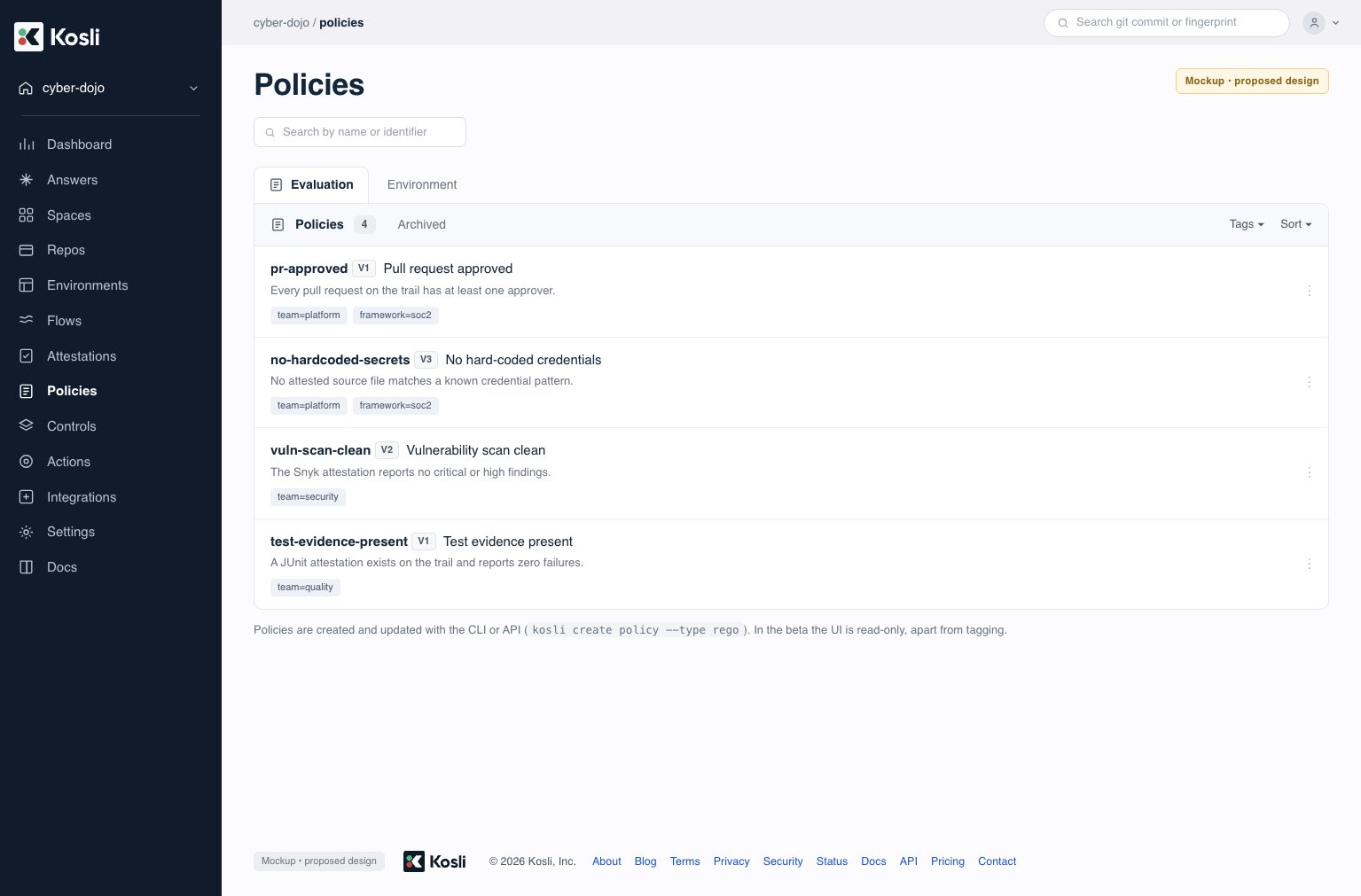 You can also list policies from the CLI. Filter to evaluation policies with `--type rego`, and by
name or tag — each entry shows the identifier and current version:
```shell theme={"theme":"dracula","languages":{"custom":["/languages/rego.json"]}}
kosli list policies --type rego --tag team=platform
```
### View a policy
Select a policy to open it. The **Policy** tab is the default view: it shows the policy-as-code
that Kosli actually runs, read-only, for the version you choose — not a name and description of it.
You can also list policies from the CLI. Filter to evaluation policies with `--type rego`, and by
name or tag — each entry shows the identifier and current version:
```shell theme={"theme":"dracula","languages":{"custom":["/languages/rego.json"]}}
kosli list policies --type rego --tag team=platform
```
### View a policy
Select a policy to open it. The **Policy** tab is the default view: it shows the policy-as-code
that Kosli actually runs, read-only, for the version you choose — not a name and description of it.
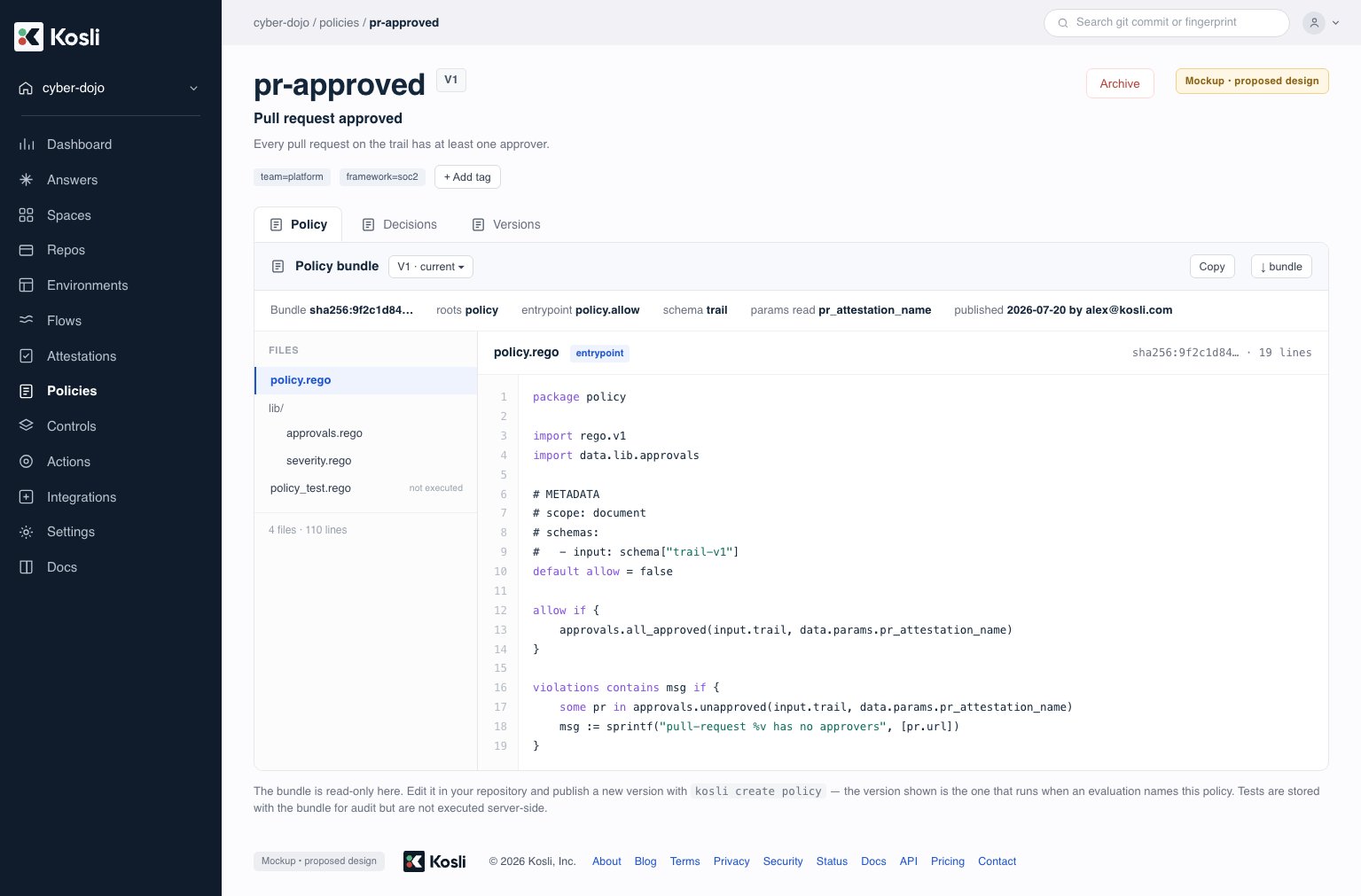 A policy can be a single `.rego` file or several, so the tab lists the files in the version and
shows the one you select. Alongside them it shows what an auditor needs to check the record: the
**bundle digest** a decision cites, the bundle's **roots** (the `data` paths it owns), the
**entrypoint** that Kosli evaluates, the declared **input schema**, and the **parameters** the
policy reads. Tests shipped with the policy are listed and marked *not executed* — Kosli stores them
as evidence the policy was tested, but only the entrypoint runs.
When you open a policy from a decision, the tab shows the version **that decision used**, not the
current one — so the source in front of you is the source that produced the outcome you are looking
at.
Policies are read-only in the Kosli UI. Edit them in your repository and publish a new version with
`kosli create policy`.
## View the decisions for a policy
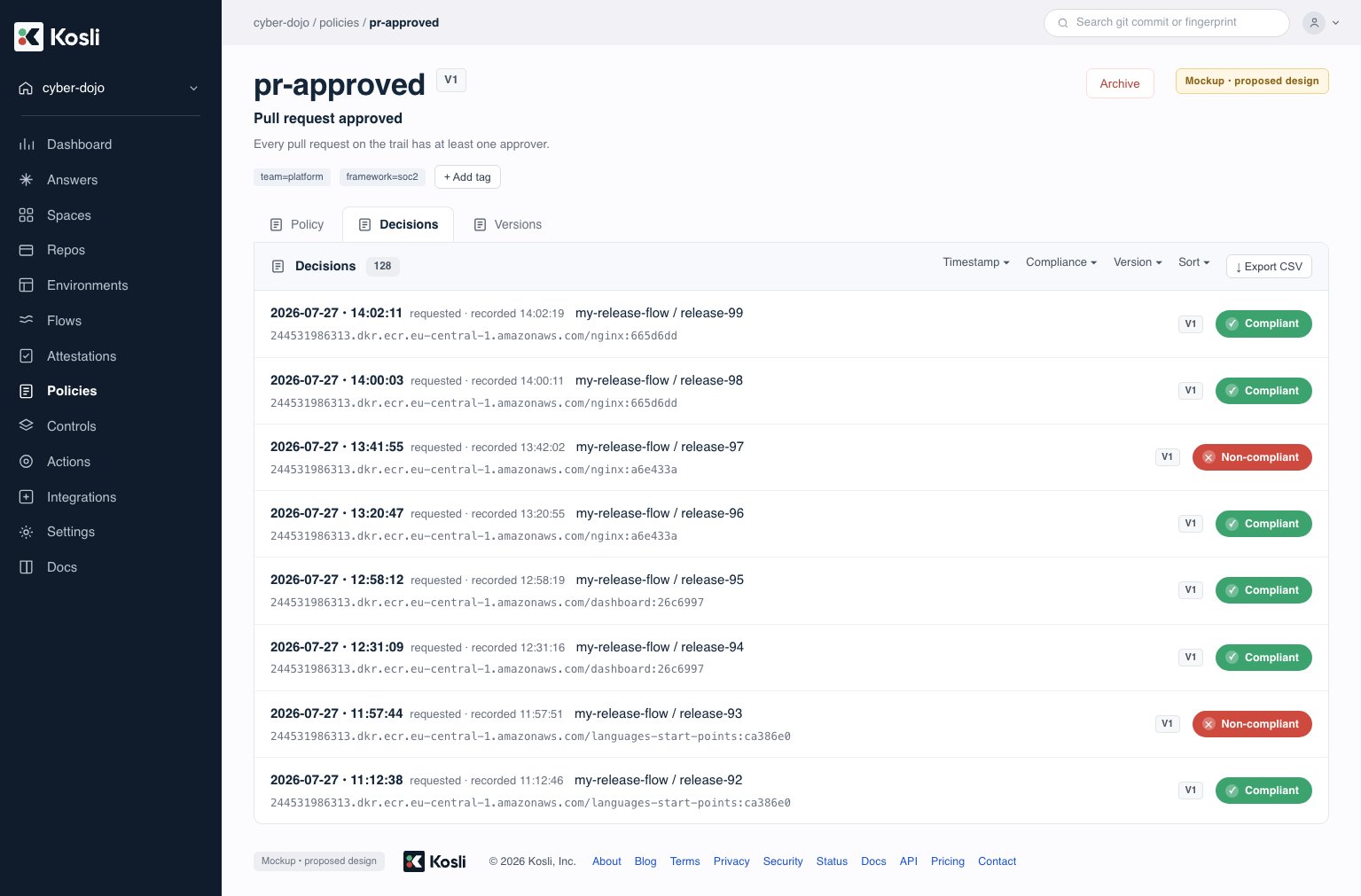
This is where **auditors and control owners** review what a policy has decided. Every decision a
policy produces is listed against that policy, across **all versions** of the policy. In the
[Kosli app](https://app.kosli.com), select **Policies**, choose a policy, and open its
**Decisions** tab. Each row shows the timestamp, the trail and artifact the decision applies
to, the policy version that produced it, and the outcome (compliant or non-compliant). Filter by
outcome, version, or time range, and page through the results to sample them.
A policy can be a single `.rego` file or several, so the tab lists the files in the version and
shows the one you select. Alongside them it shows what an auditor needs to check the record: the
**bundle digest** a decision cites, the bundle's **roots** (the `data` paths it owns), the
**entrypoint** that Kosli evaluates, the declared **input schema**, and the **parameters** the
policy reads. Tests shipped with the policy are listed and marked *not executed* — Kosli stores them
as evidence the policy was tested, but only the entrypoint runs.
When you open a policy from a decision, the tab shows the version **that decision used**, not the
current one — so the source in front of you is the source that produced the outcome you are looking
at.
Policies are read-only in the Kosli UI. Edit them in your repository and publish a new version with
`kosli create policy`.
## View the decisions for a policy
This is where **auditors and control owners** review what a policy has decided. Every decision a
policy produces is listed against that policy, across **all versions** of the policy. In the
[Kosli app](https://app.kosli.com), select **Policies**, choose a policy, and open its
**Decisions** tab. Each row shows the timestamp, the trail and artifact the decision applies
to, the policy version that produced it, and the outcome (compliant or non-compliant). Filter by
outcome, version, or time range, and page through the results to sample them.
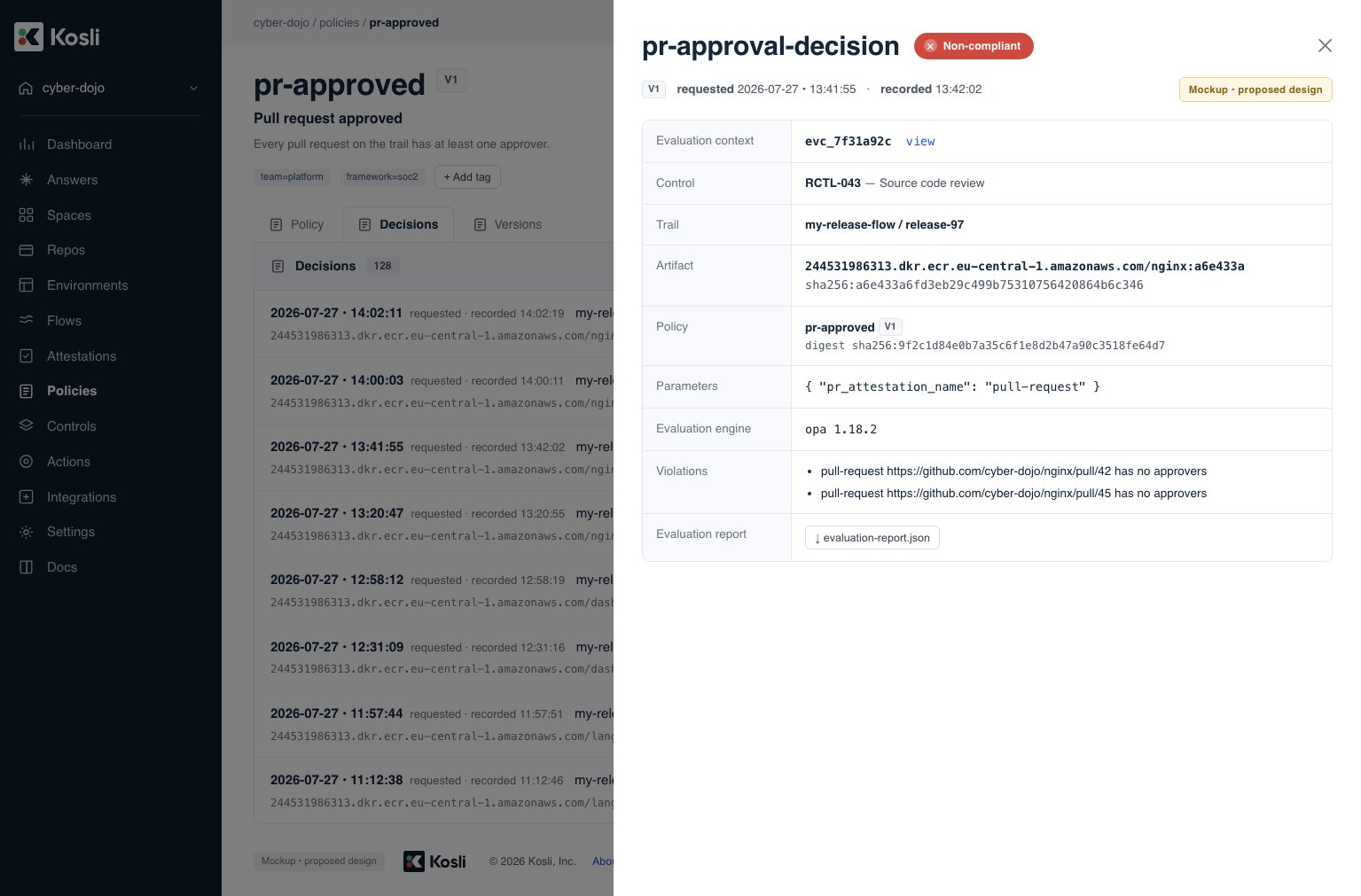
 Select a decision to open its detail, showing the trail and artifact it applies to, the policy
version and parameters that were used, the evaluation report, and any violations.
Select a decision to open its detail, showing the trail and artifact it applies to, the policy
version and parameters that were used, the evaluation report, and any violations.
 For an audit or an offline review, export the filtered set as CSV — from the Decisions view in the
UI, or from the CLI:
```shell theme={"theme":"dracula","languages":{"custom":["/languages/rego.json"]}}
kosli list decisions \
--policy pr-approved \
--compliant=false \
--since 30d \
--output csv > decisions.csv
```
`--compliant=false` surfaces every non-compliant evaluation for follow-up; combine it with
`--since` or a version filter to scope the export.
Each row shows the requested and recorded timestamps, so an export is enough to sample decisions
by when they applied rather than only by when they were written.
The same filtered sampling and CSV export are proposed for a **control's** Decisions tab, so an
auditor can sample by control as well as by policy. That is not part of the
[controls](/tutorials/working_with_controls) feature today.
Evaluations that record **no decision** do not appear here, since this view lists decisions — in the
beta you reach an ad-hoc evaluation by its ID.
### Re-run a decision offline
Sampling a decision usually raises the question of whether it was *right*. Everything the
evaluation was given is held on the **evaluation** itself, which the decision names — so you can
export it and evaluate the policy again yourself, with stock OPA, on your own machine:
```shell theme={"theme":"dracula","languages":{"custom":["/languages/rego.json"]}}
kosli get evaluation EVALUATION-ID --fixture --dir ./replay
```
Every decision shows the evaluation it came from, in the UI and in
`kosli get decision`, so the evaluation ID is one hop from the decision you are looking at.
The export contains what the evaluation was given, as ordinary OPA inputs:
| File | Contents |
| ------------ | ---------------------------------------------------------------------------------------------------------------------------------------------------------------------------------- |
| `input.json` | The trail moment that was evaluated — `input.trail` or `input.trails`. |
| `data.json` | `params` as supplied, and the `kosli.evaluation_time` that was injected. |
| `policy/` | The exact policy source that ran, laid out as it was published — one `.rego` file, or every file in the bundle. Re-digesting this directory reproduces the digest on the decision. |
Because an evaluation exists from the moment it is queued, this export also works when there
is **no decision to look at** — an evaluation still in the queue, one that failed, or one
[run without `--control`](#evaluate-without-recording-a-decision). That is usually the case you most
want to inspect.
Evaluate it with OPA directly. `--bundle` loads the whole policy directory, so the same command
works whether the policy was one file or many:
```shell theme={"theme":"dracula","languages":{"custom":["/languages/rego.json"]}}
opa eval --input replay/input.json \
--data replay/data.json \
--bundle replay/policy/ \
'data.policy.allow'
```
Because the evaluation sandbox excludes anything non-deterministic — no clock, no network, no
randomness, with time supplied as data — this returns the outcome the decision recorded. If it
doesn't, that is a finding in itself.
The export preserves the bundle's file layout because the digest is over the whole set — so an
auditor can verify the digest on the decision as well as re-run the policy, rather than taking on
trust that the exported source is what ran.
An auditor can reach the same conclusion independently, with a tool Kosli doesn't control.
The same export doubles as a **regression fixture**: commit `input.json` and `data.json` beside your
policy and assert against them with `opa test`, and a real past decision becomes a permanent test
case.
Re-running a stored decision through a *different* policy or version — to ask "what would the new
policy have said?" — is [out of scope for the beta](#out-of-scope-for-the-beta). Exporting the
fixture and running it locally is the way to answer that question today.
## Inspect a failing evaluation
When a policy denies, an **application team** needs to know why — and the decision records it
through its `violations`. Whether the policy's rules weren't met (for example, a pull request with
no approver) or an expected attestation was missing from the trail, both surface as violations on
the decision.
A policy can return **more than `allow` and `violations`** — any additional fields in its result
are captured on the decision, so you can surface richer, human-readable context beyond a bare
pass/fail.
When you gate a pipeline with `--assert`, Kosli prints the violations as markdown so failures are
readable directly in CI logs:
```shell theme={"theme":"dracula","languages":{"custom":["/languages/rego.json"]}}
kosli evaluate policy \
--flow "$FLOW_NAME" \
--trail "$TRAIL_NAME" \
--policy pr-approved \
--control RCTL-043 \
--context trail="$TRAIL_NAME" \
--fingerprint "$ARTIFACT_FINGERPRINT" \
--name pr-approval-decision \
--params '{"pr_attestation_name": "pull-request"}' \
--assert
```
```plaintext theme={"theme":"dracula","languages":{"custom":["/languages/rego.json"]}}
RESULT: DENIED
VIOLATIONS: pull-request https://github.com/acme/app/pull/42 has no approvers
```
In the Kosli UI, the violations are parsed out of the decision and rendered on the decision detail
(shown above under [View the decisions for a policy](#view-the-decisions-for-a-policy)), so an
application team can see exactly what to fix.
## Out of scope for the beta
The following are explicitly **not included** in the beta and may be addressed later. They are
listed so you can tell what has been deferred from what has not been considered — if something here
blocks you, that is worth telling us.
* **Evidence-attachment content evaluation** — evaluating the contents of attached files. Summarize
the attachment into JSON at attestation time — `--attestation-data` for a custom attestation type,
`--user-data` otherwise — and a policy can evaluate that instead — see
[What the policy sees in `input`](#what-the-policy-sees-in-input).
* **Composable policies** — combining several **separately published** policies, each with its own
identifier and version, into one evaluation. This is distinct from a bundle, where one policy spans
several Rego files under a single identifier, version, and digest. Bundles are supported.
* **Non-trail evaluate targets** — snapshots, artifacts, and generic input.
* **Scheduled evaluations** and **risk measurement**.
* **Associating policies to controls** — a stored policy-to-control link that lets Kosli infer
which policy closes which control. In the beta you name the control per evaluation with
`--control`; there is no stored mapping.
* **Pinning an evaluation to a policy version** — an evaluation always uses the policy's current
version. There is no way to hold a pipeline on version 3 while version 4 is rolled out.
* **Re-running an evaluation in Kosli** — you cannot replay a stored evaluation, either through a
different policy or version to compare outcomes, or as-is to check that it still reaches the same
answer. Export the fixture and run it locally.
* **Advisory outcomes** — a decision is compliant or non-compliant. There is no advisory or
warn-only mode that records a concern without failing the control.
* **Verbose evaluation tracing** — beyond `violations` and any custom result fields the policy
returns, there is no rule-by-rule trace of how a policy reached its answer.
* **Filtering decisions by branch or environment** — decisions can be filtered by outcome, policy
version, and time, but not by where the change came from or where it was heading.
## Next steps
* [Working with controls](/tutorials/working_with_controls) — define controls and enforce them with `for_control` and `kosli assert`.
* [Environment policies](/getting_started/policies) — require controls before an artifact runs in an environment.
* [Enforce policies](/getting_started/enforce_policies) — gate promotion on compliance in your pipeline.
* [Evaluate trails with OPA policies](/tutorials/evaluate_trails_with_opa) — the client-side `kosli evaluate` this builds on.
## Feedback
This is a design preview. If you are reviewing the proposed beta flow, the most useful feedback
is on the command surface (`kosli evaluate policy` and how policies are published),
[the Rego authoring contract](#the-rego-authoring-contract) — particularly any constraint there
that would stop you shipping a control you need — the decision and audit model, and anything in
[What's out of scope](#out-of-scope-for-the-beta) that you would expect in the beta. Share
comments with the Kosli team.
For an audit or an offline review, export the filtered set as CSV — from the Decisions view in the
UI, or from the CLI:
```shell theme={"theme":"dracula","languages":{"custom":["/languages/rego.json"]}}
kosli list decisions \
--policy pr-approved \
--compliant=false \
--since 30d \
--output csv > decisions.csv
```
`--compliant=false` surfaces every non-compliant evaluation for follow-up; combine it with
`--since` or a version filter to scope the export.
Each row shows the requested and recorded timestamps, so an export is enough to sample decisions
by when they applied rather than only by when they were written.
The same filtered sampling and CSV export are proposed for a **control's** Decisions tab, so an
auditor can sample by control as well as by policy. That is not part of the
[controls](/tutorials/working_with_controls) feature today.
Evaluations that record **no decision** do not appear here, since this view lists decisions — in the
beta you reach an ad-hoc evaluation by its ID.
### Re-run a decision offline
Sampling a decision usually raises the question of whether it was *right*. Everything the
evaluation was given is held on the **evaluation** itself, which the decision names — so you can
export it and evaluate the policy again yourself, with stock OPA, on your own machine:
```shell theme={"theme":"dracula","languages":{"custom":["/languages/rego.json"]}}
kosli get evaluation EVALUATION-ID --fixture --dir ./replay
```
Every decision shows the evaluation it came from, in the UI and in
`kosli get decision`, so the evaluation ID is one hop from the decision you are looking at.
The export contains what the evaluation was given, as ordinary OPA inputs:
| File | Contents |
| ------------ | ---------------------------------------------------------------------------------------------------------------------------------------------------------------------------------- |
| `input.json` | The trail moment that was evaluated — `input.trail` or `input.trails`. |
| `data.json` | `params` as supplied, and the `kosli.evaluation_time` that was injected. |
| `policy/` | The exact policy source that ran, laid out as it was published — one `.rego` file, or every file in the bundle. Re-digesting this directory reproduces the digest on the decision. |
Because an evaluation exists from the moment it is queued, this export also works when there
is **no decision to look at** — an evaluation still in the queue, one that failed, or one
[run without `--control`](#evaluate-without-recording-a-decision). That is usually the case you most
want to inspect.
Evaluate it with OPA directly. `--bundle` loads the whole policy directory, so the same command
works whether the policy was one file or many:
```shell theme={"theme":"dracula","languages":{"custom":["/languages/rego.json"]}}
opa eval --input replay/input.json \
--data replay/data.json \
--bundle replay/policy/ \
'data.policy.allow'
```
Because the evaluation sandbox excludes anything non-deterministic — no clock, no network, no
randomness, with time supplied as data — this returns the outcome the decision recorded. If it
doesn't, that is a finding in itself.
The export preserves the bundle's file layout because the digest is over the whole set — so an
auditor can verify the digest on the decision as well as re-run the policy, rather than taking on
trust that the exported source is what ran.
An auditor can reach the same conclusion independently, with a tool Kosli doesn't control.
The same export doubles as a **regression fixture**: commit `input.json` and `data.json` beside your
policy and assert against them with `opa test`, and a real past decision becomes a permanent test
case.
Re-running a stored decision through a *different* policy or version — to ask "what would the new
policy have said?" — is [out of scope for the beta](#out-of-scope-for-the-beta). Exporting the
fixture and running it locally is the way to answer that question today.
## Inspect a failing evaluation
When a policy denies, an **application team** needs to know why — and the decision records it
through its `violations`. Whether the policy's rules weren't met (for example, a pull request with
no approver) or an expected attestation was missing from the trail, both surface as violations on
the decision.
A policy can return **more than `allow` and `violations`** — any additional fields in its result
are captured on the decision, so you can surface richer, human-readable context beyond a bare
pass/fail.
When you gate a pipeline with `--assert`, Kosli prints the violations as markdown so failures are
readable directly in CI logs:
```shell theme={"theme":"dracula","languages":{"custom":["/languages/rego.json"]}}
kosli evaluate policy \
--flow "$FLOW_NAME" \
--trail "$TRAIL_NAME" \
--policy pr-approved \
--control RCTL-043 \
--context trail="$TRAIL_NAME" \
--fingerprint "$ARTIFACT_FINGERPRINT" \
--name pr-approval-decision \
--params '{"pr_attestation_name": "pull-request"}' \
--assert
```
```plaintext theme={"theme":"dracula","languages":{"custom":["/languages/rego.json"]}}
RESULT: DENIED
VIOLATIONS: pull-request https://github.com/acme/app/pull/42 has no approvers
```
In the Kosli UI, the violations are parsed out of the decision and rendered on the decision detail
(shown above under [View the decisions for a policy](#view-the-decisions-for-a-policy)), so an
application team can see exactly what to fix.
## Out of scope for the beta
The following are explicitly **not included** in the beta and may be addressed later. They are
listed so you can tell what has been deferred from what has not been considered — if something here
blocks you, that is worth telling us.
* **Evidence-attachment content evaluation** — evaluating the contents of attached files. Summarize
the attachment into JSON at attestation time — `--attestation-data` for a custom attestation type,
`--user-data` otherwise — and a policy can evaluate that instead — see
[What the policy sees in `input`](#what-the-policy-sees-in-input).
* **Composable policies** — combining several **separately published** policies, each with its own
identifier and version, into one evaluation. This is distinct from a bundle, where one policy spans
several Rego files under a single identifier, version, and digest. Bundles are supported.
* **Non-trail evaluate targets** — snapshots, artifacts, and generic input.
* **Scheduled evaluations** and **risk measurement**.
* **Associating policies to controls** — a stored policy-to-control link that lets Kosli infer
which policy closes which control. In the beta you name the control per evaluation with
`--control`; there is no stored mapping.
* **Pinning an evaluation to a policy version** — an evaluation always uses the policy's current
version. There is no way to hold a pipeline on version 3 while version 4 is rolled out.
* **Re-running an evaluation in Kosli** — you cannot replay a stored evaluation, either through a
different policy or version to compare outcomes, or as-is to check that it still reaches the same
answer. Export the fixture and run it locally.
* **Advisory outcomes** — a decision is compliant or non-compliant. There is no advisory or
warn-only mode that records a concern without failing the control.
* **Verbose evaluation tracing** — beyond `violations` and any custom result fields the policy
returns, there is no rule-by-rule trace of how a policy reached its answer.
* **Filtering decisions by branch or environment** — decisions can be filtered by outcome, policy
version, and time, but not by where the change came from or where it was heading.
## Next steps
* [Working with controls](/tutorials/working_with_controls) — define controls and enforce them with `for_control` and `kosli assert`.
* [Environment policies](/getting_started/policies) — require controls before an artifact runs in an environment.
* [Enforce policies](/getting_started/enforce_policies) — gate promotion on compliance in your pipeline.
* [Evaluate trails with OPA policies](/tutorials/evaluate_trails_with_opa) — the client-side `kosli evaluate` this builds on.
## Feedback
This is a design preview. If you are reviewing the proposed beta flow, the most useful feedback
is on the command surface (`kosli evaluate policy` and how policies are published),
[the Rego authoring contract](#the-rego-authoring-contract) — particularly any constraint there
that would stop you shipping a control you need — the decision and audit model, and anything in
[What's out of scope](#out-of-scope-for-the-beta) that you would expect in the beta. Share
comments with the Kosli team.